No One Writes Content? I Built a Content Site Using This Clever Trick

Many friends DM me, “How do you run a content site solo and update so frequently?” My answer is a bit cheeky—because I never hired any writers. Since handing the entire content production chain over to machines, I’ve gone from a typist to a hands‑off manager. Today, no more beating around the bush, I’ll break down the method of building a site from zero to one without hiring anyone.
Step 1: Turn Topic Selection into a Fill‑in‑the‑Blank Exercise
Without writers, topic selection must lower creation costs. My biggest pain used to be spending half an hour staring at the editor each day, wondering what to write, and ending up with a generic filler piece that got no rankings or traffic.
Later I realized that standardized content like product reviews, keyword Q&A, and trend analyses are ideal for automation. First, create a set of content templates that fix the title structure, paragraph distribution, and placement of internal links. Then document the brand context—terminology, tone, common product names. Each topic selection then becomes a fill‑in‑the‑blank: fill in the keyword, product link, and reference source, and you can outline a week’s direction in ten minutes.
After applying this method to my own site, topic selection time dropped from two hours a day to ten minutes in the first three months. It wasn’t because I became more creative, but because I gave up the obsession with “originality” and switched to “structured output”. Honestly, lacking writers forced a more standardized content framework, and the SEO results ended up better than when I outsourced to writers.
Step 2: Find the “Tool” That Can Write for You
The key in choosing an AI content tool isn’t whether it can write, but whether it can automatically generate output that follows brand style, internal linking rules, and SEO metadata. I tried several tools; the output either smelled like ChatGPT or had chaotic internal links, requiring me to edit each article manually.
Then I switched to SEONIB. It lets me first configure the brand context—industry terminology, voice style, internal link preferences, external link rules, SEO metadata templates—and store everything as a knowledge base. After setting up the brand context, each subsequent article generation time dropped from 25 minutes to a single click. It automatically drafts from keywords or product links, and even handles multi‑platform synchronization.
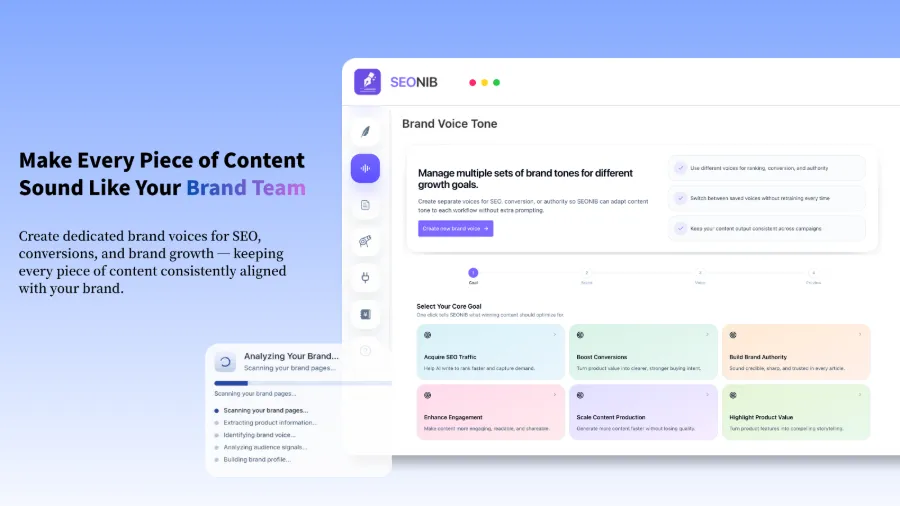
There’s a pitfall: the easiest thing for automation to mess up isn’t quality, but consistency of the “brand voice”. In the second month I made a joke—an article generated by the system contained a homophone typo, and readers screenshot‑posted the complaint in the comments. Since then I enforce a quick manual spot check for every AI article before publishing—five minutes to scan, focusing on factual errors and brand terminology. This habit has saved me many times.
If you also want to find a suitable tool, check out the mainstream options on the market, such as the Top 10 AI Content Marketing Tools Overview which offers many comparisons. Also, pre‑loading the brand context is crucial; I wrote a note on How Brand Consistency Affects AI Search Rankings where I documented the pitfalls I encountered. For practical guidance, see One‑Click Convert Product Pages to Blog with SEONIB, which outlines a fairly complete workflow.
Step 3: Make Content Publish Automatically Like an Alarm Clock
Finishing a draft is only the first step; the real challenge for most people is staying consistent with daily updates. I set a target of one article per day, and the system executes the schedule automatically.
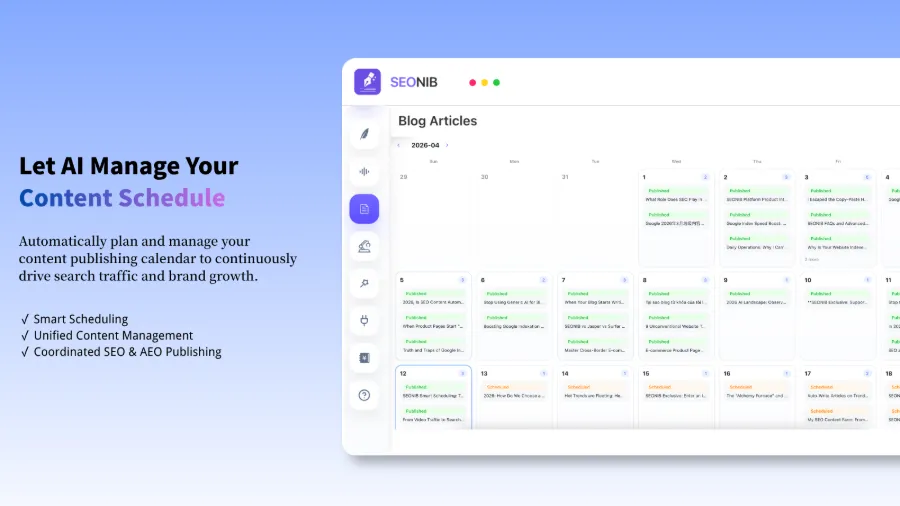
I first set up a content calendar in the backend: reviews on Monday, Q&A on Tuesday, trend analyses on Wednesday… then connect the APIs of all platforms (WordPress, Shopify). Once the AI generates the content, it pushes it directly to each site, eliminating the need to log into the backend manually.
After three months, I saw a 230% increase in indexed pages. This number made me realize that the cumulative effect of continuous output far outweighs the effort of polishing a single article. Automation solved the hardest part—“consistency”—not through willpower but through the system.
Step 4: Don’t Let Your Content Rot on the Server—Fast Indexing Tricks
What’s the biggest fear after generating content? Not being indexed. I once had a carefully written article sit on the server for two weeks before Google finally crawled it. Then I did two things: first, optimize the internal linking structure to ensure each new article gets at least one internal link from an older post; second, use a tool to automatically submit the sitemap and new URLs to search engines.
After optimizing internal links, new page indexing speed dropped from seven days to under 24 hours. For details, see the Comprehensive Solution for Slow Indexing of New Sites, which provides full diagnostic methods and steps.
Tools like SEONIB already have built‑in automatic submission, so no extra hassle.
By the way, more detailed technical configurations and advanced usage can be found in the Help Documentation.
FAQ
Q1: Without writers, will AI‑generated content be penalized by search engines for poor quality?
There’s no direct penalty, but the content must add informational value. I make sure every AI article includes at least one of my own observations or data, such as “what I discovered after testing.” I also perform manual spot checks, focusing on factual errors and brand terminology. Google values user value, not the production method.
Q2: I’m not technical—can a single person handle site building and automation?
Yes. Choose a solution that includes a CMS and automation tools, such as Shopify or WordPress with plugins. My site went from domain registration to a working automation pipeline in one afternoon; the technical barrier is lower than you think.
Q3: If all content is AI‑written, can you still build brand trust?
Yes, but you need to inject real information into the brand context—product specs, customer case studies, industry terminology must be manually verified. I also add a short “author’s note” at the end of each article with genuine work details, which makes readers feel it’s grounded.
Q4: Are automation tools expensive? Are they worth it for a small site?
I ran the numbers; the writing costs saved in three months cover two years of tool fees. Small sites can start with a basic plan and publish one article per day, with negligible cost. The key is that the saved time can be spent on operations and promotion.
Q5: How can I control each article’s style and factual accuracy?
Spend half a day drafting a brand guide that lists prohibited words, preferred phrasing, and citation style for facts. Feed this guide into the tool’s knowledge base. After each generation, lock down a few key checks: product names, numbers, technical terms. After a month, the template stabilizes, and you can reduce spot‑check frequency to 10%.
Share Article