
SEONIB's Complete Guide to Creation: From Inspiration to Global Distribution
Last Updated:4/12/2026
I. Speed-Up Foundation: Project Auto-Fill
Before starting any creation, configuring project information saves 80% of repetitive input time.
• Configuration Path: Project Switch > Project Settings (bottom-left corner of sidebar).
• Function: After saving “Product Name” and “Official Website Link,” these fields will auto-populate for all future blog creations.
II. Five Creation Modes: Choose by Need
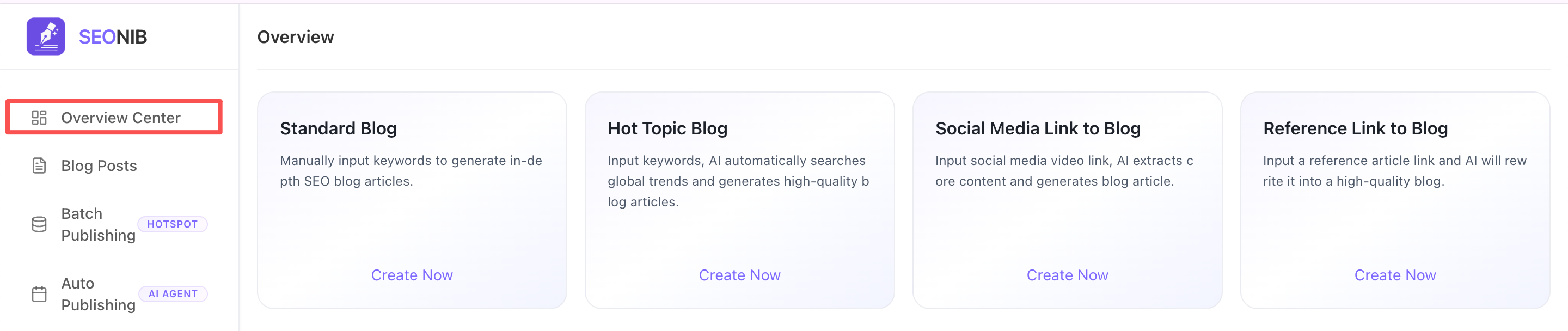
1. Standard Blog (Keyword-Driven)
• Scenario: You have core keywords and need to generate in-depth SEO articles.
• Action: Enter keywords and word count, use quick templates (e.g., product comparisons) to define logic, and generate with one click.
2. Industry Hotspot Blog (Timeliness-Driven)
• Scenario: Track real-time traffic and rewrite trending industry topics.
• Operation: Enter industry terms > Click “Get Latest Trends” (1 point) > Select topic > AI automatically rewrites and embeds brand information.
3. Social Media Link to Blog (Multi-Platform Integration)
• Scenario: Convert video traffic into search traffic.
• Supported Platforms: TikTok, YouTube, Instagram, Facebook, Twitter, LinkedIn.
• Operation: Paste video link > AI analyzes video (1 point) > Automatically converts to long-form SEO blog post.
4. Reference Link to Blog (Deep Rewrite)
• Scenario: Use competitor articles, industry reports, or high-quality webpages as references.
• Operation: Paste webpage URL; AI deeply analyzes its structure and rewrites it into original content.
5. Handwritten Blog (Free Creation)
• Scenario: Fully autonomous writing with AI enhancement support.
• Access: Blog List > Handwritten Blog. Provides a blank canvas supporting manual input and access to all editor enhancement tools.
SEONIB Five Creation Mode Feature Comparison Table
| Creation Mode | Core Input Material | Credit Cost | Key Advantage | Target Scenario |
| Normal Blog | Keywords | 1.0 | High-speed generation; deep focus on SEO authority | Clear business keywords exist; need to produce long articles in bulk |
| Hot Topic | Industry terms + Real-time hotspots | 1.0 + 1.0 (to fetch hotspots) | Tracks global trends; built-in traffic potential | Following current events/industry news; intercepting traffic via hot terms |
| Social-to-Blog | Video or Social Post Links | 1.0 + 1.0 (to analyze video) | Cross-platform conversion; turns video traffic into long-tail traffic | Repurposing content from TikTok, YouTube, etc., into blog posts |
| Reference Link | Webpage URL | 1.0 | Structured rewriting; draws on the best available content | "Secondary creation" based on competitor articles or in-depth reports |
| Manual Blog | Pure manual input | 0 | Highest freedom; deep integration of AI-assisted tools | Requires full control over layout or simple manual entry of articles |
III. Editor: AI-Enhanced Toolkit
1. Intelligent Image Pairing System
• AI Generation: Input descriptive text to produce original images.
• Local Upload: Supports uploading proprietary assets.
• Image Library Search: Enter keywords to retrieve vast image collections; click “Smart Insert” to embed into text.
• Favorites Function: Click the “heart” icon in the top-right corner of an image to save it to a favorites tag for cross-article reuse.
2. Multilingual & SEO
• Global Distribution: Supports 44 languages. Select one as primary during creation or translate with one click post-generation.
• Smart SEO: Click the SEO tab to automatically generate Meta Title and Description (0.2 credits), with synchronized translation alongside main text.
3. Secure Archiving
• Save Draft: Click “Save Draft” in the top-right corner to sync progress to the cloud anytime, supporting cross-device editing.
IV. Publishing & Integration: Final Step
1. Pre-Publishing Self-Check (Friendly Reminder)
• Functionality: The system displays completion progress for title, SEO, body text, cover image, etc.
• Non-Mandatory: This window serves as a quality control reference. You may still click “Continue Publishing” even if translations are incomplete or SEO elements are missing.
2. Publishing Settings
• Custom Slug: We recommend clicking “AI Generate” to obtain the most search engine-friendly URL path.
• Free Multi-Channel Distribution: Supports one-click synchronization to Shopify, WordPress, Shopline, My Site, or push to your Webhook via HTTP API.