
AI Agent Auto-Publish Guide
Cập nhật lần cuối:3/14/2026
Auto-Publish (AI Agent) is the critical link in SEONIB's "Full-Loop Automation." Once configured, the AI will automatically discover materials, create content, generate images, and distribute posts to your store based on your strategy—enabling true 24/7 automated growth of your content assets.
I. Core Value: Why Enable Auto-Publish?
- Maintain Update Frequency: Search engines (like Google) favor sites with consistent updates. Auto-publish ensures your store never falls behind.
- 24/7 Operation: Even while you rest, the AI Agent is capturing global hotspots and converting them into traffic.
- Cross-Platform Sync: Connect to Shopify, WordPress, or distribute to your own platform via API with one click.
II. The Four-Step Automation Setup
Starting an automated task requires only four simple steps:
- Lock Content Source: Select your pre-created "Automated Information Source" (Keywords, PAA, or Excel).
- Plan Publishing Rate: Set the number of daily generations and the specific execution time.
- Customize Languages: Enable multi-language creation with one click to cover global markets.
- Full Auto-Distribution: Connect your site and launch the 24/7 AI operation mode.
III. Detailed Task Configuration Guide
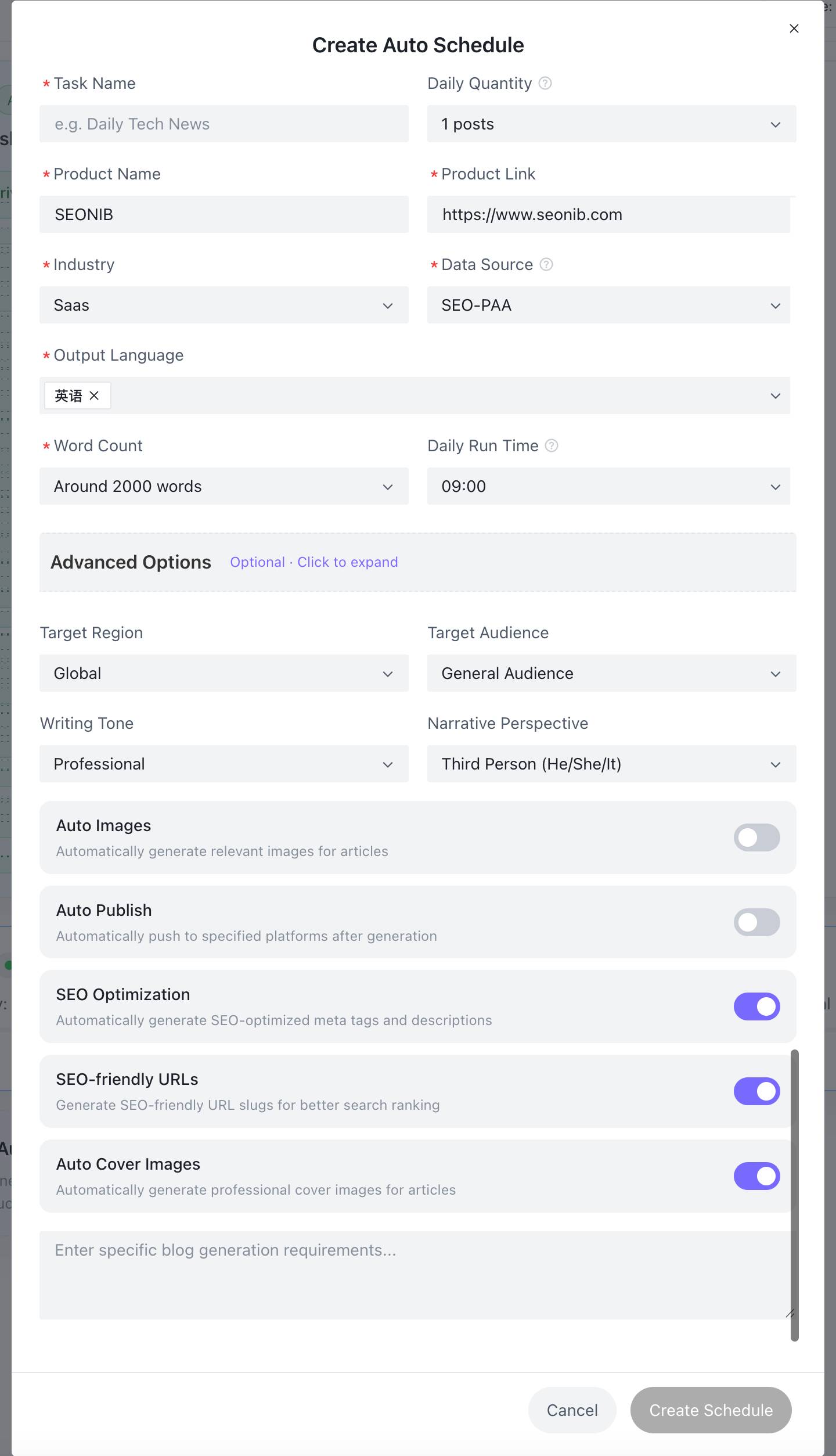
In the "Edit/New Automation Task" window, you can perform deep personalized customization:
1. Basic Plan Settings
- Task Name: Name your plan (e.g., Summer New Arrivals SEO Plan).
- Daily Quantity: Supports tiered selection (e.g., 3 posts per day) to simulate a natural manual update rhythm.
- Source Association: Select a Bulk Publishing Information Source from the dropdown as your "raw material" library.
- Execution Time: Set the specific time for daily creation (recommended to avoid your site’s peak traffic hours).
2. Content Strategy Customization
- Output Language: Supports simultaneous generation in multiple major languages including Simplified Chinese, English, Thai, Vietnamese, etc.
- Word Count: Choose based on SEO depth requirements (e.g., Long-form articles of approx. 3000 words).
- Writing Style & Point of View: Select "Professional/Formal" or "Friendly/Casual," and set 1st or 3rd person perspective.
3. Advanced Automation Switches (Select all for the best experience)
- Auto Image & Auto Cover: AI matches high-quality illustrations and covers for every article to improve click-through rates.
- SEO Optimization Switch: Automatically generates Meta Tags and Descriptions to ensure indexing results.
- SEO Friendly Links: Automatically rewrites URL Slugs to make them more attractive to search engines.
- Auto-Publish (The Core Switch):ON: Content is pushed immediately to your integrated site after generation for true hands-off operation.OFF: Content is saved as a draft in the "Blog List" page, allowing you to manually review and refine it before publishing.
IV. Task Management & Monitoring
On the "Auto-Publish" main interface, you can clearly track the status of all AI Agents:
- Real-time Status: View if a task is "Running," along with daily/total output counts (e.g., Today: 0/3, Total: 22).
- Next Run Schedule: Clearly displays exactly when the AI is scheduled to start its next task.
- Flexible Scheduling: Use the toggle on the right to pause or restart any automated task at any time.
V. Expert Advice: Best Practice Combinations
- Keyword Monitoring + 1 Post/Day: Ideal for tracking long-term industry hotspots and building authority.
- Excel Import + Bulk Publishing: Perfect for new stores to quickly fill up with a large amount of foundational brand content.
- PAA Mining + Multi-language: Best for driving global traffic for cross-border e-commerce by addressing real user concerns in different countries.